 Sage.Education

Every school district in America has a procurement process for textbooks. Most have one for classroom software. Almost none have one for the tool their students use more than any other: the search engine.
Google is the default on school devices not because a committee reviewed it, not because a privacy officer approved its AI features, and not because parents were consulted. It is the default because it came bundled with Google Workspace for Education, and nobody questioned it.
Our previous article in this 3 part series, Google's AI Is Lying to Your Kids, explained why that default is now dangerous: a German court ruled in May 2026 that Google's AI Overviews generate false statements and that Google is liable for them as a publisher.[1]
This article is about what comes next. There are search engines built from the ground up to protect the person using them. They do not track queries. They do not build advertising profiles. They do not paste an AI-generated paragraph at the top of the page and call it the answer. Some are free. One can even run privately on a $35 computer in a school server closet.
The question is not whether alternatives to Google Search exist. They do. The question is why your child's school has never heard of them.
The Menu Nobody Opened
At least seven privacy-first search engines are available today. Most school districts have evaluated zero of them. Illustration: Sage.Education.
The landscape of private search engines in 2026 is broader than most people realize. Each one makes a different trade-off between privacy, result quality, and ease of use. Here are some of the options that matter most for families and schools.
DuckDuckGo is the most familiar name on this list, processing roughly 100 million searches per day.[2] It does not track users, does not build profiles, and does not serve targeted ads. Its results come from a mix of sources including Bing, its own crawler, and over 400 other data feeds. A Safe Search filter is available for blocking explicit content. DuckDuckGo recently added an AI assistant called DuckAssist, but it is opt-in: it does not appear unless you ask for it. That single design choice separates it from Google, where AI Overviews appear whether you want them or not.
The trade-off: DuckDuckGo does not save search history, which means parents cannot monitor what their child searched for through the engine itself. For families that want both privacy and oversight, this requires a separate conversation about trust and transparency at home.
Startpage, based in the Netherlands and subject to EU privacy law (GDPR), takes a different approach.[3] It acts as a privacy shield between you and Google. When you search on Startpage, your query goes to Google's index, but Startpage strips out all identifying information first. You get Google-quality results without Google knowing who asked. Startpage also offers an "Anonymous View" feature: a built-in proxy that lets you visit any search result without the destination website seeing your real IP address.
The trade-off: because Startpage relies on Google's index, it inherits some of Google's biases and blind spots. It does not, however, inherit AI Overviews. There is no AI-generated paragraph at the top. You get links. You click them. You read.
Brave Search built its own independent web index from scratch, which means it does not depend on Google or Bing for results.[4] It does not log searches, does not store personal data, and includes automatic content filtering. Brave offers optional AI summaries, but like DuckDuckGo, they only appear when you ask. A free tier serves most users. A premium tier at $29.99 per year removes all advertising.
The trade-off: the Brave browser (a separate product from Brave Search) has faced scrutiny over its cryptocurrency integration and past data-handling practices. Brave Search can be used in any browser, and on its own merits as a search engine, the privacy credentials are strong. But schools evaluating Brave should look at the search engine and the browser as separate decisions.
Swisscows, headquartered in Switzerland, was designed from the start as a family-safe search engine.[5] It filters explicit content at the index level, meaning adult material never enters the results in the first place rather than being hidden after the fact. It stores no user data and runs its servers in the Swiss Alps, subject to Swiss privacy law.
The trade-off: the index is smaller than Google's or Bing's. Academic research on niche topics may return fewer results. For everyday school searches, Swisscows is more than sufficient. For a graduate-level research paper, it is not.
Qwant, based in France, is another EU-native search engine that collects no user data.[6] It offers a dedicated version called Qwant Junior, built specifically for children, with content filtering tuned for school-age users. Qwant Junior is used in French public schools.
The trade-off: similar to Swisscows, the index is smaller. Qwant's strength is its commitment to European data protection standards and its child-specific product.
The One You Can Run Yourself
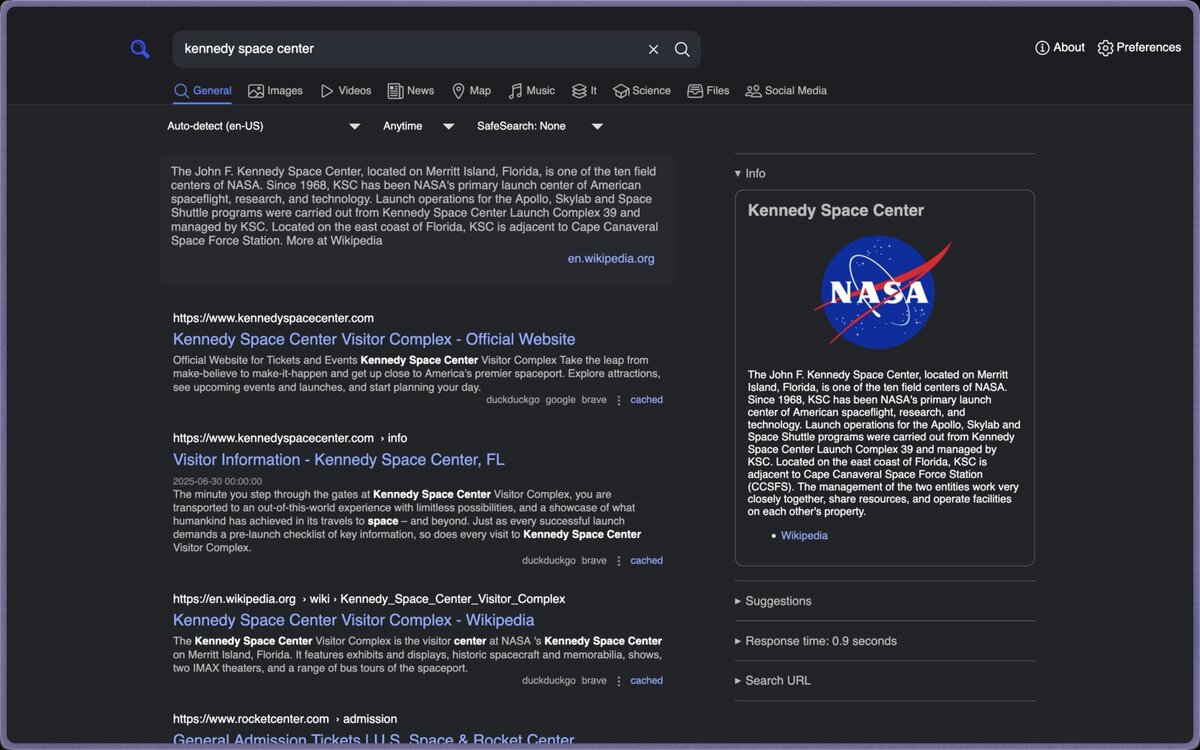
SearXNG is a free, open-source metasearch engine that can run on a Raspberry Pi. It aggregates results from 269+ search engines without revealing the user's identity to any of them.
All of the search engines listed above are run by companies. You trust those companies to honor their privacy promises, and for most families, that trust is reasonable. But there is one option that removes trust from the equation entirely: SearXNG, a free, open-source metasearch engine that you host yourself.[7]
SearXNG does not have its own index. Instead, it sends your query to Google, Bing, DuckDuckGo, and dozens of other engines simultaneously, collects the results, strips out every tracker and identifier, and presents them to you in a clean, ad-free page. None of the upstream engines know who searched. SearXNG does not log queries. There is no account. There is no profile. There is nothing to sell because there is nothing to collect.
The current version, 2026.6.15, supports over 269 search engines in 58 languages.[8] It runs on Linux, can be installed via Docker in under an hour, and works on hardware as modest as a Raspberry Pi. A school with a single IT staff member and a $35 computer could run a private search engine for every student in the building.
The trade-off: SearXNG requires technical setup. There is no "sign up and go" option. Content filtering must be configured manually. For schools without IT capacity, over 70 public SearXNG instances are listed at searx.space, hosted by volunteers and organizations around the world. Using a public instance still protects you from Google's tracking, though you are trusting the instance operator not to log queries.
A school district that already manages its own servers will find SearXNG the most powerful option on this list. It is the only one where the school controls the entire system.
The Compliance Question
Privacy is not just a preference in schools; it is the law. In the US, COPPA restricts data collection from children under thirteen (expanded in April 2026 to cover biometrics)[9] and FERPA protects student education records.[10] In Canada, PIPEDA requires parental consent for children under thirteen,[11] and Quebec's Law 25 carries penalties up to C$25 million.[12][13] In the EU, the GDPR sets the default consent age for children at sixteen (member states can lower it to thirteen),[14] and the Digital Services Act and UK Age Appropriate Design Code require platforms to minimize data collection from minors by default.[15][16] The common thread across all three jurisdictions: tools used by children must minimize data collection, obtain appropriate consent, and be transparent about what they do with the information they gather.
Not one of the private search engines profiled in this article collects data that can be tied to an individual. DuckDuckGo, Startpage, Brave Search, Swisscows, and Qwant all state in their privacy policies that they do not log user-identifiable search data. SearXNG, when self-hosted, collects nothing by default because the school controls the software.
Compare this to Google Workspace for Education, where search queries flow through Google's infrastructure alongside email, documents, and calendar data. Google states that it does not use student data for advertising in its education products. But the data exists, it is stored, and it passes through AI systems that a court has found generate false statements.[1:1] In our opinion, the safest data, from a compliance standpoint, is data that was never collected.
What You Lose
None of these alternatives are Google.
Google's index is the largest on the internet. Its results for obscure, technical, or highly localized queries are often better than any competitor's. The result quality gap is real but narrower than most people assume. For the kinds of searches students perform most often (homework questions, research topics, current events) DuckDuckGo and Startpage return results that are functionally equivalent to Google's.
The gap widens for highly specialized queries. A chemistry teacher searching for a specific reagent supplier may find Google's results more complete. A seventh-grader searching for "causes of the American Revolution" will not notice a difference.
The AI Overviews gap is not a loss. It is the point. These alternative search engines return links, not AI-generated paragraphs. The student clicks, reads, and evaluates. That is not a step backward; it is what research looks like.
The Conversation That Needs to Happen

Most school boards have never discussed which search engine students use on school devices. The procurement process that governs textbooks does not extend to the tool students use more than any textbook. Photo: Maryland GovPics / Jay Baker, licensed under CC BY 2.0.
Any alternative in this article can be implemented in a single afternoon. Changing the default search engine on a managed Chromebook fleet takes one policy change in the Google Admin console. Setting DuckDuckGo or Startpage as the default requires no new software, no new contracts, and no new budget line. A school IT administrator can do it before lunch.
The harder part is the conversation that comes before the change.
For parents:
Ask your child's school one question: "What search engine do students use on school devices, and has the district evaluated its AI features?" If the answer is "Google, and no," you now know more about the issue than most administrators do. Share this article. Ask for it to be discussed at the next school board meeting.
For school administrators:
The search engine is not a neutral utility. It is a tool that either collects student data or does not, that either generates AI answers or does not, and that either has been evaluated for privacy compliance or has not. Evaluate it the way you evaluate a textbook: who made it, what does it collect, and does it meet your legal obligations under COPPA, FERPA, PIPEDA, or the GDPR?
For IT staff:
Test DuckDuckGo or Startpage as the default on a pilot group of devices for 30 days. Document what works and what breaks. If the answer is "nothing breaks," you have your recommendation. If SearXNG is within your capacity, stand up an instance and let teachers try it. The results may surprise them.
The next article in this series, Your Browser Is the First Surveillance Camera Your Child Walks Past, goes one layer deeper: the browser itself. The search engine handles what your child asks. The browser handles everything else, including what it reports back before a single query is typed.
The Form Asks for a Vendor Name
The two Munich publishers sued Google because the AI lied about them. They had standing because the false statements were about their businesses. A school district whose students receive millions of wrong answers per year does not have the same standing. The harm is diffuse. It lands on a thirteen-year-old who copies a wrong answer into their homework assignment and never knows it was wrong.
But the district does have the power to stop routing students through that system. The procurement form asks for a vendor name. For DuckDuckGo, write "DuckDuckGo." For Startpage, write "Startpage BV, Netherlands." For SearXNG, write the truest answer a school can give about any tool it controls completely: "ourselves."
Footnotes
Disclosure: This article is published by Sage.Education, a product of Startr LLC. Sage.Education builds open-source, self-hostable educational tools designed to be transparent and auditable. Startr LLC has no financial relationship with any search engine mentioned in this article. The views expressed are those of the editorial board.
Regional Court of Munich, Case 26 O 869/26, May 28, 2026. See Google's AI Is Lying to Your Kids for full analysis. ↩︎ ↩︎
DuckDuckGo Privacy Policy. Daily search volume reported by DuckDuckGo Traffic. ↩︎
Startpage: The Privacy-First Search Engine. Startpage operates under GDPR as a Netherlands-based company. ↩︎
Best Privacy Search Engines 2026: Startpage vs Brave vs DuckDuckGo, PrivacyOn, 2026. ↩︎
Best Private Search Engines 2026: Tracker-Free Ranked, Vucense, 2026. ↩︎
12 Privacy-Focused Search Engines for 2026, BlockSurvey, 2026. ↩︎
Welcome to SearXNG, SearXNG Documentation, 2026. ↩︎
About SearXNG, SearXNG Documentation (2026.6.15+). ↩︎
EdTech Compliance 2026: FERPA, COPPA, and SOC2 Requirements Explained, The SOC2, 2026. ↩︎
Federal Laws Enabling Parents to Protect Their Children's Privacy, Parent Coalition for Student Privacy. ↩︎
PIPEDA Fair Information Principle 3 – Consent, Office of the Privacy Commissioner of Canada. Children under 13 require parental consent. See also Collecting from Kids? Ten Tips for Services Aimed at Children and Youth. ↩︎
Quebec Law 25: What Canada's New Privacy Law Requires, BigID. Fully in force since September 22, 2024. Penalties up to C$25 million or 4% of worldwide turnover. ↩︎
Consultation on the Development of a Children's Privacy Code – What We Heard, Office of the Privacy Commissioner of Canada, 2026. ↩︎
Art. 8 GDPR – Conditions Applicable to Child's Consent in Relation to Information Society Services. Default age is 16; member states may lower to no less than 13. ↩︎
Data Protection Day 2026: Keeping Children's Personal Data Safe Online, European Data Protection Board, January 2026. ↩︎
Age Appropriate Design: A Code of Practice for Online Services, UK Information Commissioner's Office. ↩︎